Garage Stock Control: When a Spreadsheet Starts Costing You Money
A practical guide for independent garages that want to track oil, parts, labour, invoice lines and profit without another messy spreadsheet.
7 July 2026 · Last updated 20 October 2026 · 8 min read
Stock control in a garage rarely fails because nobody cares. It fails because the workshop is busy, the oil is used in litres, parts arrive in boxes, labour is sold by the hour, and nobody has time to update a spreadsheet after every invoice.
At first, a stock spreadsheet feels fine. Then the same oil appears twice under different names, labour accidentally becomes stock, parts get fitted but not deducted, and profit reports cannot be trusted.
This guide explains what independent garages should track, where spreadsheets break down, and why stock control works best when it is connected to job sheets and invoices.
What a garage actually needs to track
A garage does not need warehouse software. It needs a simple, reliable way to know what is on the shelf, what was used on a job, what was sold to the customer, and what it cost the business.
The important part is separating physical stock from services. Oil, bulbs, treatments, filters and parts can reduce stock. Labour, diagnostics and service packages should not.
| Item type | Example | How it should behave |
|---|---|---|
| Physical stock | Oil, filters, bulbs, treatments | Quantity reduces when invoiced |
| Parts ordered for a job | Brake pads, discs, sensors | Can be sold with a cost and margin |
| Labour | Diagnostic hour, fitting time | Shows on invoices but does not reduce stock |
| Service package | Full service, health check package | Can be sold as a line item without stock movement |
Where stock spreadsheets go wrong
Spreadsheets are easy to start and hard to keep accurate. They rely on everyone remembering to update the right row at the right time, using the same naming, units and prices every time.
That is where the quiet cost appears. The stock list says one thing, the shelf says another, and the invoice does not show whether the job actually made money.
- The same item gets entered under slightly different names.
- Units become messy: litre, litres, per litre, bottle, tin, each.
- Labour gets treated like stock and creates confusing movements.
- Parts are fitted and invoiced, but stock is not deducted.
- Cost price changes later, making old profit figures unreliable.
Stock should link to the invoice, not sit separately
The cleanest point to deduct stock is when the invoice is created. That is when the work becomes a customer charge, the line items are clear, and the stock movement has a real reason.
If a mechanic adds oil or a treatment to the job sheet, it should be ready for the invoice. But the actual stock deduction should happen when that invoice is created, so draft work does not accidentally reduce quantities.
- Job sheet records what was used or planned.
- Invoice copies the finished line items.
- Stock reduces only for stock-tracked items.
- Labour and services appear on the invoice without reducing quantity.
- Stock movements stay attached to the invoice for audit.
Use clear units, not confusing labels
A garage stock list should be readable at a glance. The unit field should describe how the item is sold or used: per litre, per tin, per bottle, per hour, per treatment or each.
The quantity column should stay numeric. If the stock says 200, and the unit says per litre, the person reading it understands the garage has 200 litres available. Mixing the unit into the quantity makes reports harder to trust.
- Quantity: 200
- Unit: Per Litre
- Invoice price: GBP 10.00 / Per Litre
- Reorder level: 50
- Status: Active or low stock
Cost price matters as much as sale price
A garage can have a busy month and still not know what it made if invoice lines do not store cost. Sale price tells you what the customer paid. Cost price tells you what the work cost the business.
For stock items, the invoice should snapshot the cost at the time of sale. That way, if the supplier price changes next month, last month's profit report does not change underneath you.
- Revenue is the customer charge before VAT.
- Cost is the internal cost of parts, stock, labour or service items.
- Gross profit is revenue minus cost.
- Margin shows whether the job was priced properly.
- VAT should not be counted as profit.
What Mechanics Hub does differently
Mechanics Hub keeps stock practical for a small garage. Stock and service items can be selected on job sheets and invoices, then inventory-linked invoice lines update stock automatically.
The aim is not to turn a workshop into a warehouse. It is to stop stock disappearing into memory, keep invoices consistent, and give the owner a clearer view of profit.
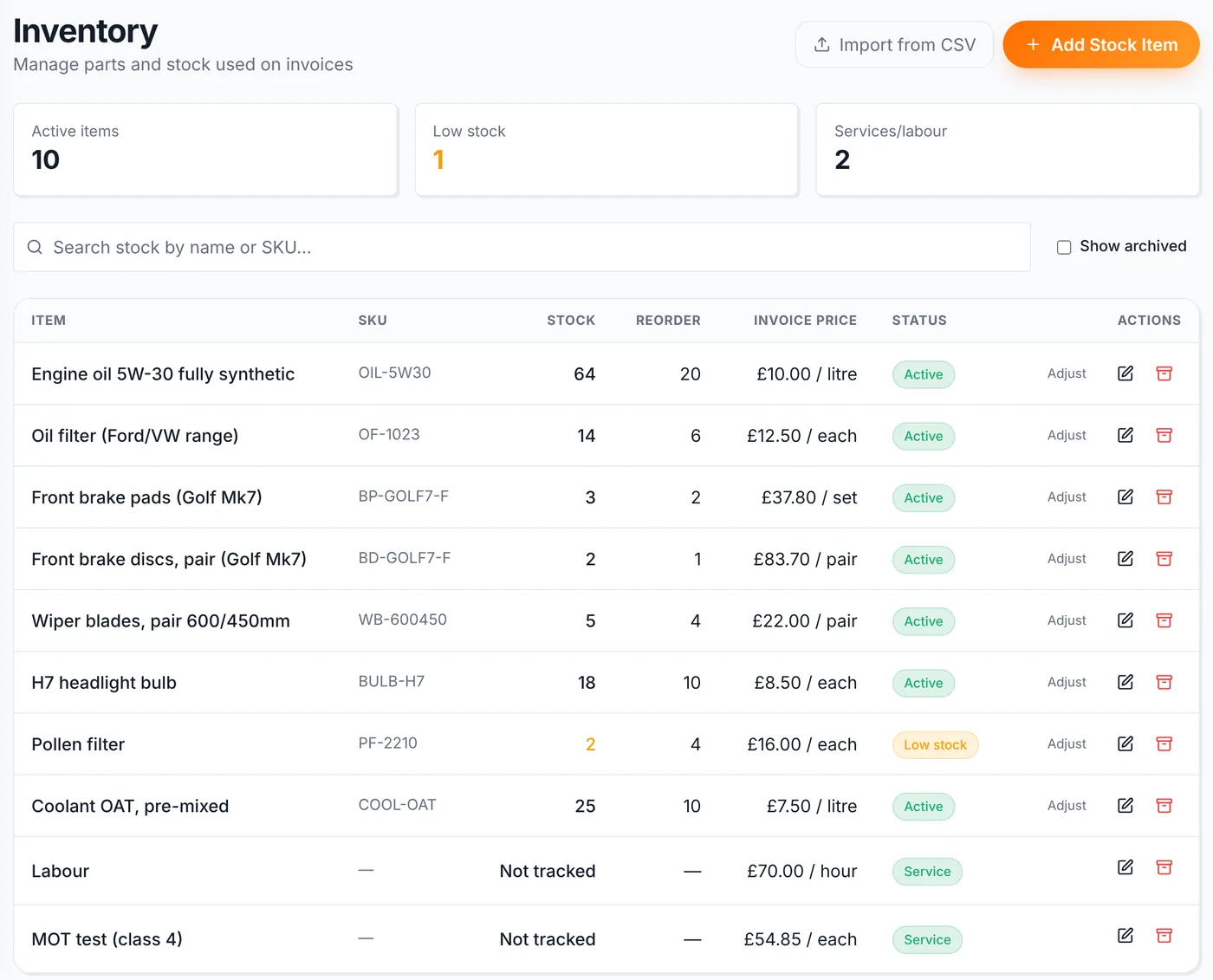
- Stock and parts control for physical items.
- Service and labour items that do not reduce quantity.
- Invoice-linked stock deduction.
- Cost snapshots for profit reporting.
- Low-stock warnings without another spreadsheet.
Still running stock from a spreadsheet?
Mechanics Hub connects customers, vehicles, job sheets, stock, invoices and profit reporting so parts and labour stay tied to the work.
Useful next steps
If stock is starting to feel messy, the next step is to connect parts and labour to the jobs and invoices that use them.
Frequently asked questions
What is garage stock control?
Garage stock control is the process of tracking parts, oil, treatments, bulbs and other items used or sold by the workshop. Good stock control shows what is on hand, what has been used on invoices, and when items need reordering.
Can a garage use a spreadsheet for stock control?
Yes, but it gets difficult as soon as several people are using stock, invoice lines need to deduct quantities, or the owner wants accurate cost and profit reporting. A spreadsheet is easy to start but easy to forget.
Should labour be tracked as stock?
No. Labour and diagnostics should be invoice line items, but they should not reduce stock quantity. Physical items like oil, parts and treatments are the things that should usually have stock movements.
When should stock reduce in garage software?
The safest point is when the invoice is created or finalised. Job sheets can record planned parts and labour, but stock should usually reduce when those items become invoice lines.
Why does cost price matter on invoices?
Cost price lets the garage calculate gross profit and margin. If a part costs GBP 30 and sells for GBP 39, the invoice should store both values so reports show the real profit, not just revenue.
Does Mechanics Hub replace a stock spreadsheet?
For most independent garages, yes. Mechanics Hub can hold stock and service items, put them onto invoices, deduct stock for physical items, and keep labour or service lines separate from tracked stock.
Bottom line
Stock control only works when it follows the real workshop flow. The item is on the shelf, it is used on a job, it appears on an invoice, and the business knows what it cost.
If that chain is split between a pad, a spreadsheet and memory, profit gets cloudy quickly. Mechanics Hub keeps parts, labour, invoices and job history connected so stock control stays practical for a busy independent garage.