Stock is easy to lose track of
Oil, treatments, bulbs and common parts often move faster than a spreadsheet can keep up with.
Stock and parts
Garage stock control software for independent UK workshops: track parts, oil, labour, invoice usage, low stock and profit without spreadsheets.
What it handles
Track parts, oil, labour and invoice usage without spreadsheets.
Why it matters
Stock control only works if it follows the job. If oil, treatments and parts are sold on invoices but counted somewhere else, the numbers are already out of date.
Oil, treatments, bulbs and common parts often move faster than a spreadsheet can keep up with.
Many garages want labour and service packages available on invoices, but they should not show as low-stock products.
If cost prices are not saved when an invoice is created, profit and margin reports become unreliable.
How Mechanics Hub helps
✓ Create stock items for parts, fluids and consumables with units such as each, per litre, per tin or per treatment.
✓ Create service and labour items that appear on invoices without being treated as stock.
✓ Invoice-linked stock items deduct quantity and create a stock movement audit trail.
✓ Cost prices can be snapshotted on invoice lines to support gross profit and margin reporting.
Inventory holds every part and service you sell. Each item has a name, an optional SKU, an item type, a unit, a cost price, an invoice price, the quantity on hand and a reorder level. Units are flexible: oil by the litre, pads by the set, discs by the pair, labour by the hour.
Stock items are physical parts and their counts go down as you use them. Service items, such as labour and fixed-price jobs like an MOT, never touch your stock counts. When a part's quantity falls to its reorder level, it's flagged as low stock.
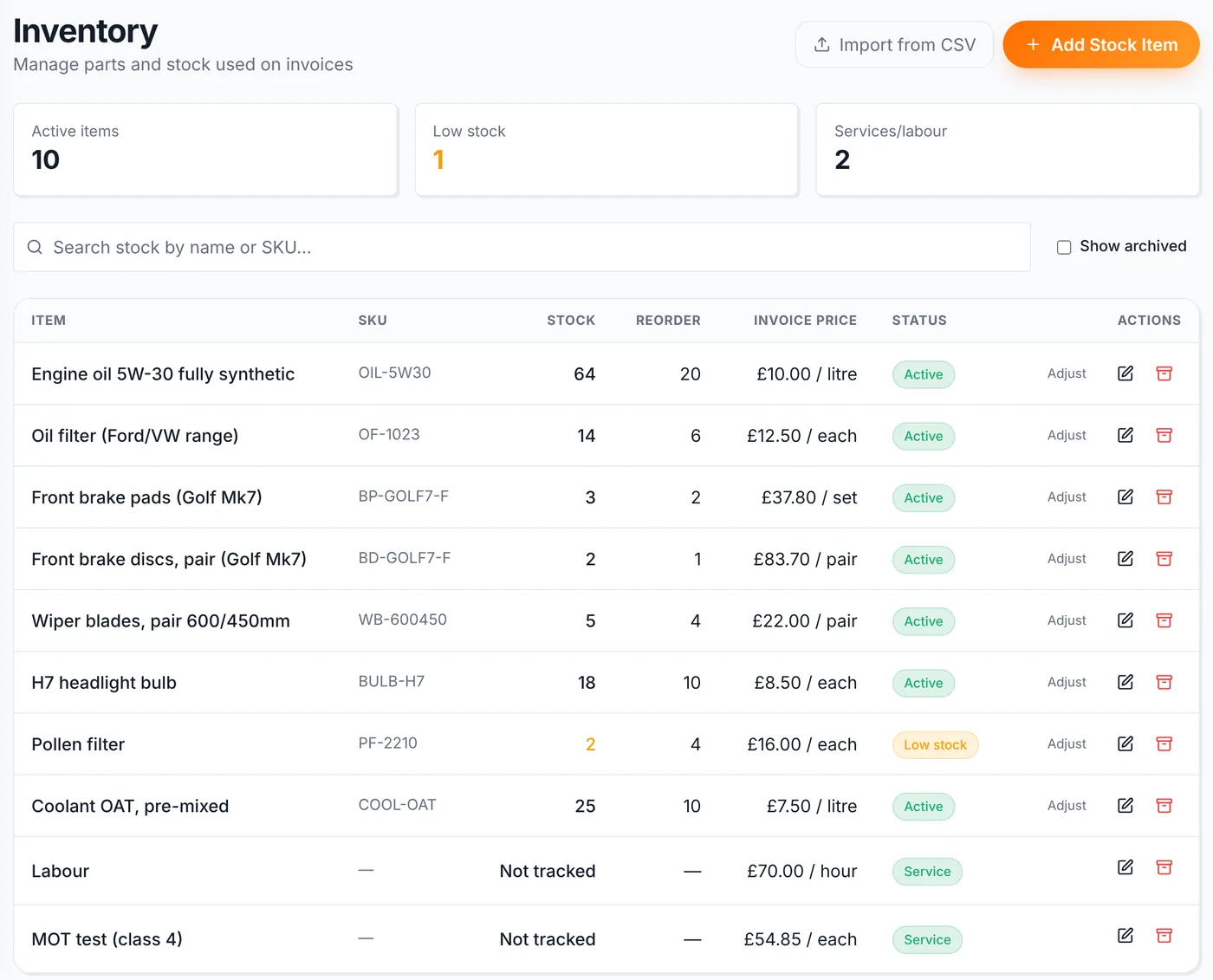
When a stock part goes on an invoice, its quantity comes off your stock count and the movement is recorded, so you can see where parts went. Delete or cancel the invoice and the parts go back. Adding parts to a job sheet doesn't change stock, so drafts never knock your counts out.
Use Adjust on an item to record a delivery or correct a count after a stock take.
If your parts are in a spreadsheet or a motor factor's list, save it as a CSV and import it on the Inventory page. The file needs a header row and a name or description column, and common column names for SKU or part number, cost, price, quantity and reorder level are picked up automatically. You see a preview before anything is saved.
Keeping the cost price on each item means invoices record what parts cost you as well as what the customer paid. That's for your own profit reporting and never appears on the customer's invoice. Our free parts markup calculator shows the selling price and margin for any markup.
Useful next steps
Why spreadsheets eventually break down for garage stock control and what to use instead.
Open → Free toolWork out sale price and gross profit from a part cost and markup percentage.
Open → Help articleLearn how stock items, service items and invoice usage work in Mechanics Hub.
Open → GuideUnderstand what should go on a UK garage invoice and how line items should be laid out.
Open →Connected features
Replace paper job cards with a connected workshop record.
Bring customers back before MOT and service dates are missed.
Create branded invoices from jobs, parts and labour without retyping the work.
Run the workshop in Mechanics Hub and keep Xero as your accounts ledger, without retyping invoices.
See every bay, technician and booked job on one screen, then work straight from the job sheet.
Digital red, amber and green checks with photos, attached to the vehicle and easy to share with the customer.
FAQ
Mechanics Hub lets you add labour and service items so they can be selected on invoices, but they are marked as service items and do not reduce stock.
Stock reduces when an invoice is created or finalised through the invoice workflow, not while a job sheet is still being edited.
Yes. Units are flexible, so you can track oil per litre, treatments per tin, sprays per bottle, labour per hour and custom units that suit your garage.
No. It gives workshop-level stock, cost and gross profit visibility. Xero can still be used for formal accounting when connected.
Software that keeps a garage's parts list with quantities, costs and prices, reduces stock as parts are invoiced and flags items that need reordering, so you're not relying on a spreadsheet or memory.
Yes, if you can save it as a CSV. It needs a header row and a name or description column. Common column names for part number, cost, price, quantity and reorder level are recognised, and you see a preview before importing.
Try the full workflow
Add a customer, link a vehicle, create a job sheet, use stock or labour, send updates and build the invoice from the same record.