Paper job cards go missing
A handwritten card can sit on a ramp, in a car, or under a pile of invoices. The customer history then disappears when you need it most.
Digital job sheets
Digital job sheets for UK garages: record the complaint, diagnosis, parts and labour, print job cards for the bay and turn finished work into invoices.
What it handles
Replace paper job cards with a connected workshop record.
Why it matters
A job sheet should be the place the work lives. Not a loose card, not a WhatsApp message, and not a half-remembered note when someone starts the invoice at the end of the day.
A handwritten card can sit on a ramp, in a car, or under a pile of invoices. The customer history then disappears when you need it most.
If parts, labour and notes are written separately, someone has to type the same job back into the invoice later.
Customer complaints, technician notes, faults and health checks are more valuable when they stay attached to the same vehicle record.
How Mechanics Hub helps
✓ Job sheets sit inside the job, so the diary, customer, vehicle and work record stay connected.
✓ Technicians can record the request, diagnosis, completed work, internal notes, approval notes, parts and labour in one place.
✓ Printable job cards are available for workshops that still want paper beside the vehicle.
✓ When the job is ready, the invoice can be built from the work record instead of starting from a blank page.
Each job has its own job sheet, opened from the job or from Job Sheets. It holds the customer's complaint, your diagnosis, the work carried out, technician notes and customer approval notes, alongside the mileage in and out and road tested and ready ticks.
Parts, labour and other lines sit underneath with a quantity, unit, price and cost. Pick parts from your stock list or type a manual line, and the total for each line is worked out as you go.
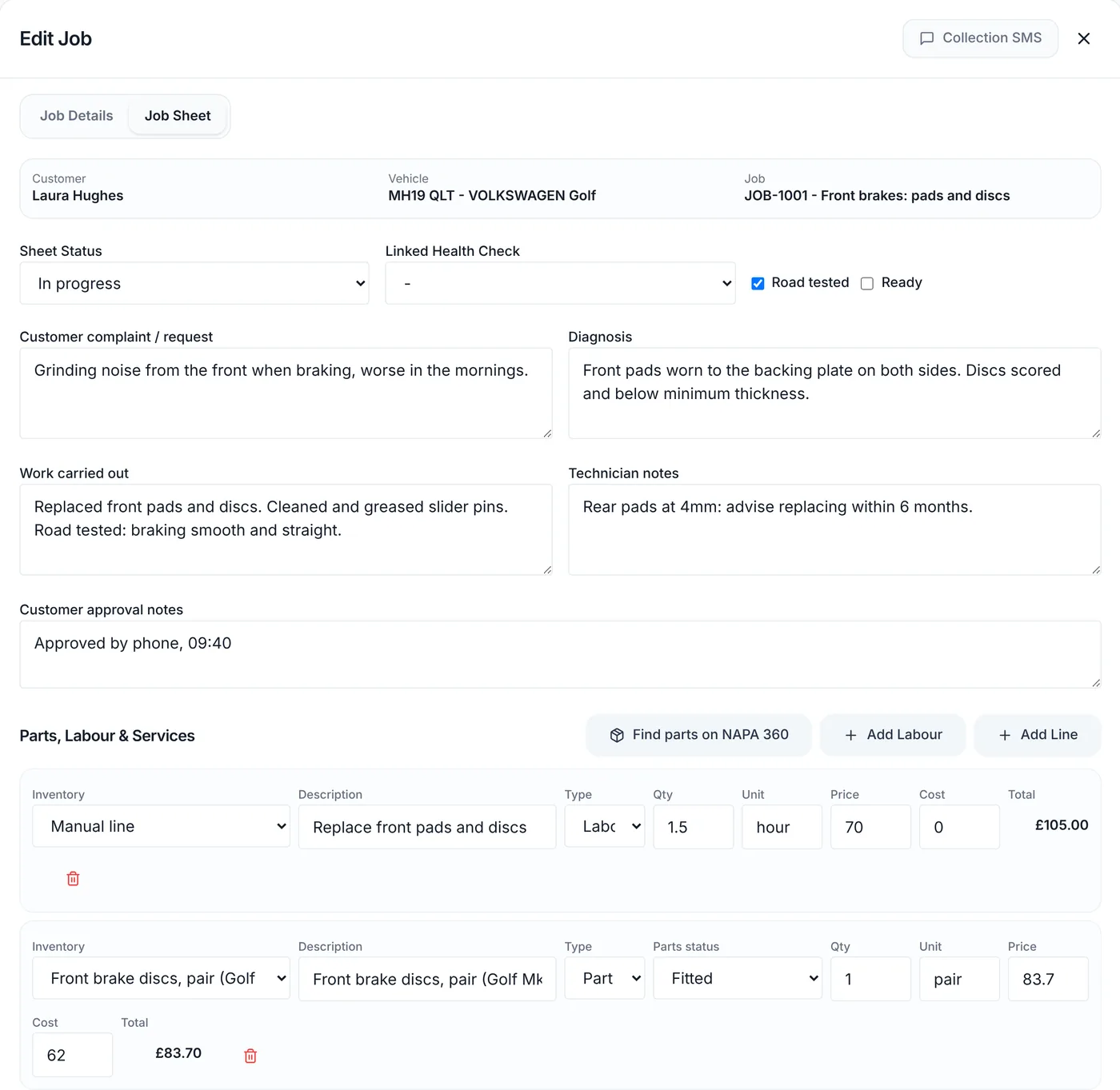
Each part line can carry a status: Needed, Ordered, Arrived or Fitted. It shows what you're waiting on without ringing the factor. If you type a part that isn't in your stock list, you can save it to your catalogue from the line so it's there next time.
Add before photos of the car's condition on arrival and after photos of the finished work. They're timestamped and stay private to your workshop.
When extra work needs a yes, create an approval link from the job sheet and send it by text, email or WhatsApp. The customer sees the work and prices and taps approve or decline. They don't see your cost prices or technician notes. Each link works once and expires after 72 hours, and the decision is recorded on the job sheet.
Not every technician wants a screen. Print a clean A4 job sheet from the Jobs list, or use Save & Print Sheet when you book the job. The printout doesn't show your costs or profit. Technicians work from the clipboard, and the office types the parts and hours in afterwards. Technicians don't need a login.
When the work is done, create the invoice from the job sheet. The customer, vehicle, mileage and lines carry over. Stock only comes off your count when the invoice is created, so editing a job sheet never changes your stock by accident.
Useful next steps
Try a simple browser-only job card template before moving the workflow into Mechanics Hub.
Open → GuideA practical guide on moving from paper job cards to a digital workshop process.
Open → Help articleStep-by-step help for using job sheets inside Mechanics Hub.
Open → Help articleFollow the core flow from customer record to booked job.
Open →Connected features
Track parts, oil, labour and invoice usage without spreadsheets.
Bring customers back before MOT and service dates are missed.
Create branded invoices from jobs, parts and labour without retyping the work.
Run the workshop in Mechanics Hub and keep Xero as your accounts ledger, without retyping invoices.
See every bay, technician and booked job on one screen, then work straight from the job sheet.
Digital red, amber and green checks with photos, attached to the vehicle and easy to share with the customer.
FAQ
A digital job sheet is the workshop work record for a job. It stores the customer request, diagnosis, work carried out, technician notes, parts, labour and invoice-ready lines without relying on loose paper job cards.
Yes. Mechanics Hub keeps the job sheet digital, but you can print a clean internal garage job card or vehicle job card when a technician wants a paper copy beside the vehicle.
No. Stock is only deducted when the invoice is created, so draft job sheet changes do not accidentally reduce inventory.
Yes. Job sheet lines can be copied into a draft invoice, keeping parts, labour, quantities and descriptions connected to the finished work.
Software that replaces the paper job card with a digital record for each job: the complaint, diagnosis, work carried out, parts, labour and notes, saved against the customer and vehicle and turned into the invoice when the work is finished.
Yes. Create an approval link from the job sheet and send it by text, email or WhatsApp. The customer sees the work and prices, taps approve or decline, and the decision is saved on the job sheet. Each link works once and expires after 72 hours.
No. Technicians are names you assign work to, not user accounts. They can work from a printed job sheet while the office keeps the digital record.
Try the full workflow
Add a customer, link a vehicle, create a job sheet, use stock or labour, send updates and build the invoice from the same record.