Invoices get rebuilt from notes
When work is written on paper or in messages, someone has to type it again into the invoice and hope nothing is missed.
Garage invoice software
Garage invoice software for UK garages: branded invoice PDFs from job sheets, stock and labour lines, card payment links and Xero sync.
What it handles
Create branded invoices from jobs, parts and labour without retyping the work.
Why it matters
Garage invoicing should not start from a blank page after the job is finished. The customer, vehicle, mileage, work carried out, parts and labour should already be close to the invoice.
When work is written on paper or in messages, someone has to type it again into the invoice and hope nothing is missed.
Prices, units and descriptions become inconsistent when every invoice line is entered from memory.
If the invoice only stores what the customer paid, the owner cannot easily see cost, gross profit or margin later.
How Mechanics Hub helps
✓ Build invoices from customer and vehicle records instead of starting with a blank template.
✓ Select stock, service and labour items so descriptions, units and prices stay consistent.
✓ Keep internal cost snapshots away from the customer PDF while supporting profit visibility.
✓ Use payment links where enabled and Xero sync where connected without changing the local invoice PDF.
Every invoice shows the customer, the job it came from, each line with its quantity and unit price, and the subtotal, VAT and total. Everything you do with an invoice happens on the same screen: email it to the customer, preview or download the PDF, copy a card payment link, send a ready-for-collection text, mark it paid, issue a credit note or sync it to Xero.
The PDF carries your logo, business details and brand colour, so it looks like your garage's paperwork rather than a generic template.
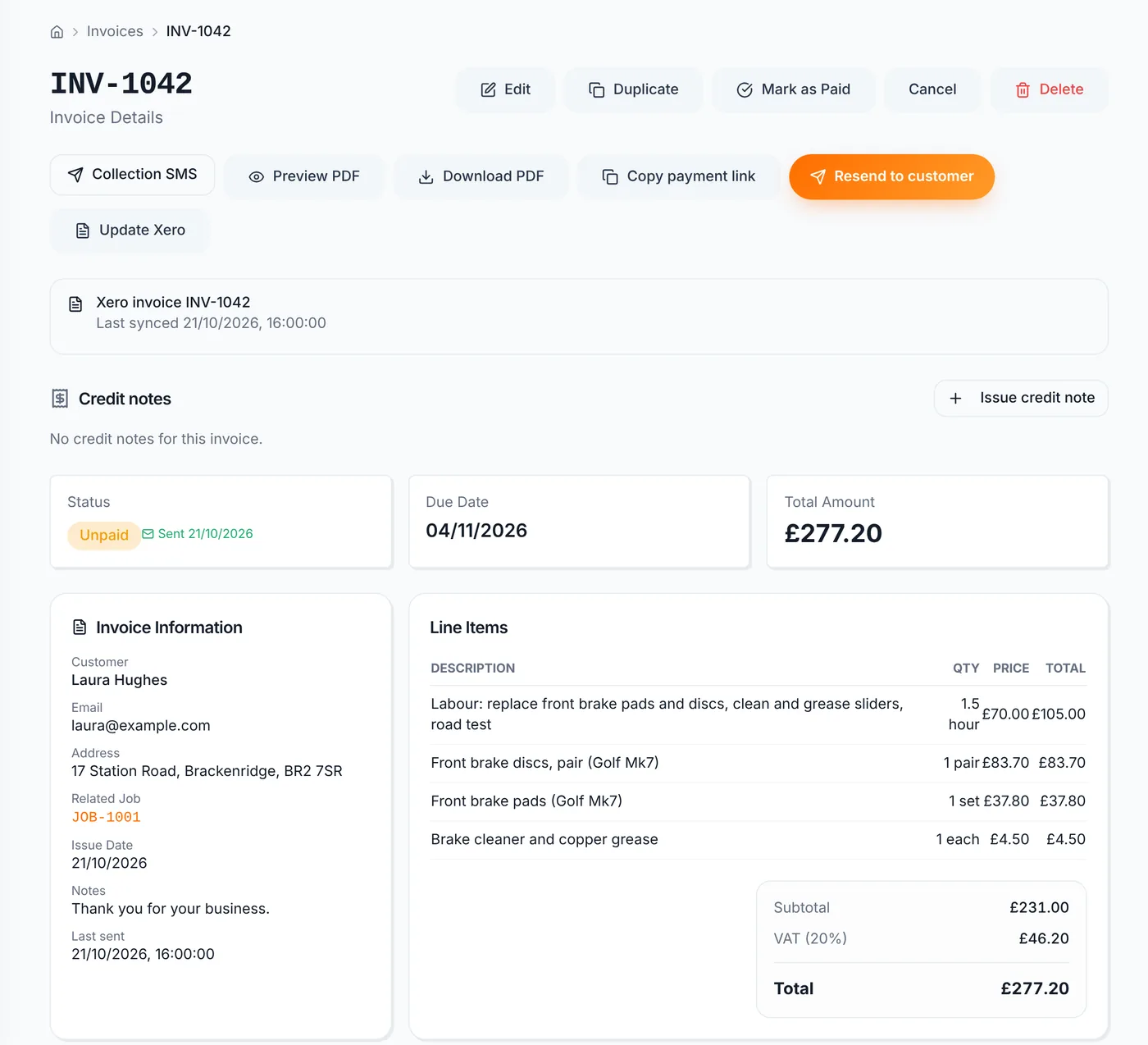
The usual way to invoice is from the finished job sheet. The customer, vehicle, mileage and every part and labour line carry over, so the invoice is built from the work you actually recorded. For work that didn't have a job, you can create an invoice straight from Invoices.
Send to customer emails a link where they can view the invoice online and download the PDF. If you've connected your own Stripe account, Copy payment link gives you a secure pay-by-card page to send by text, email or WhatsApp. When the customer pays, the invoice is marked paid automatically and the money goes to your Stripe account.
For cash, bank transfer or card-machine payments, edit the invoice and set it to paid. On a paid plan, Collection SMS sends a prefilled "your car is ready" text, and you see the message before it goes.
Set your default VAT rate once in Business Settings and every new invoice starts with it. Each invoice has its own VAT rate field, so you can change one invoice without touching the default. Garages that aren't VAT registered set the rate to 0%.
If you're VAT registered, add your VAT registration number in Business Settings. It prints on every invoice, on the PDF and on the online copy your customer sees.
Because the VAT rate applies to the whole invoice, an approved MOT test centre charging no more than the maximum fee should put the MOT test fee on its own invoice at 0%. HMRC treats that fee as outside the scope of VAT. The repairs then go on a separate invoice at 20%.
With Xero connected, Sync to Xero on the invoice creates an approved invoice in Xero using Xero's own invoice numbering, with your Mechanics Hub invoice number saved as the reference. If you edit the invoice later, Update Xero sends the change. Payments you record in Mechanics Hub go across too, and changes made directly in Xero are picked up.
Useful next steps
Create a simple browser-only invoice PDF before moving the workflow into Mechanics Hub.
Open → GuideWhat UK garages should include on invoices and how to structure line items.
Open → Help articleHow branded invoice PDFs and invoice defaults work inside Mechanics Hub.
Open → GuideWhy stock and labour lines work better when they connect to invoices.
Open → GuideImport Xero customers and sync invoices with the right VAT.
Open →Connected features
Replace paper job cards with a connected workshop record.
Track parts, oil, labour and invoice usage without spreadsheets.
Bring customers back before MOT and service dates are missed.
Run the workshop in Mechanics Hub and keep Xero as your accounts ledger, without retyping invoices.
See every bay, technician and booked job on one screen, then work straight from the job sheet.
Digital red, amber and green checks with photos, attached to the vehicle and easy to share with the customer.
FAQ
Garage invoice software helps a workshop create branded invoices, add parts and labour, calculate totals and keep invoice history connected to the customer and vehicle.
Yes. Mechanics Hub can generate branded invoice PDFs with the workshop logo, business details, customer details, vehicle details, line items, VAT, payment details and notes.
Yes. Stock, service, labour and manual lines can be used. Physical stock can deduct quantity through the invoice workflow, while labour and service items do not reduce stock.
No. Mechanics Hub handles workshop invoices and can sync invoice data to Xero when connected. Xero can still remain the accounting ledger.
Build the invoice from the job record rather than a blank template, take parts from your stock list and reduce stock when they're invoiced, handle VAT with your VAT number on the invoice, email the customer an online copy and PDF, take card payments, issue credit notes and sync to your accounting software.
Yes, once you connect your own Stripe account. Copy the payment link from the invoice and send it by text, email or WhatsApp. The customer pays on a secure page, the invoice is marked paid automatically and the money goes to your Stripe account.
Each invoice has its own VAT rate, so put the MOT test fee on its own invoice at 0% and any repairs on a separate invoice at 20%. HMRC treats the test fee as outside the scope of VAT when an approved test centre charges no more than the maximum fee.
Try the full workflow
Add a customer, link a vehicle, create a job sheet, use stock or labour, send updates and build the invoice from the same record.