Paper checks get binned
A ticked sheet handed over at collection is rarely read, and the advisories are forgotten by the next visit.
Vehicle health checks
Digital vehicle health checks for UK garages: pass, advisory and fail ratings with photos, saved to the vehicle's history and printable for customers.
What it handles
Digital red, amber and green checks with photos, attached to the vehicle and easy to share with the customer.
Why it matters
A health check is one of the easiest ways for a garage to find genuine extra work and build trust. On paper it gets lost or ignored. Done digitally, with photos, the customer can see exactly why a tyre or brake pad needs attention.
A ticked sheet handed over at collection is rarely read, and the advisories are forgotten by the next visit.
Being told the brakes are low over the phone is easy to put off. A photo of the worn pad is not.
If amber items aren't saved against the vehicle, nobody follows them up when the car comes back.
How Mechanics Hub helps
✓ Use a health check template that suits your workshop and complete it on a phone, tablet or desktop.
✓ Mark each item red, amber or green and add notes and photos where they help.
✓ Health checks stay on the vehicle history, so advisories are there next visit.
✓ Share the check with the customer or print a clean copy for the counter.
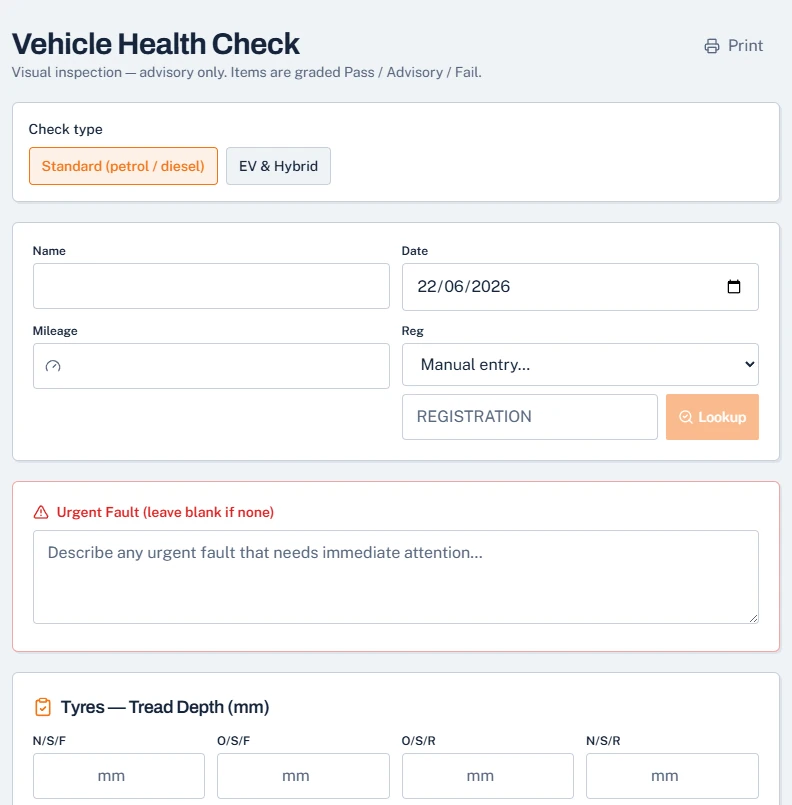
Open Health Checks, then New Health Check, on a phone or tablet. Choose the check type, Standard for petrol and diesel or EV & Hybrid, look up the registration and add the mileage. Then work through the checklist, marking each item Pass, Advisory or Fail, with notes and photos where they help.
Tread depth is recorded in millimetres for each tyre, and anything that needs attention before the car is driven goes in the urgent fault box at the top.
Finished checks are saved under Health Checks, then Reports, where you can view, print or export them to PDF to send by email or WhatsApp. Faults you've found are listed under Health Checks, then Faults, so they don't get forgotten. You can link a health check to the job sheet so the two stay together.
Health checks work straight away with the built-in checklist. On a paid plan you can upload your own sheet, so the checklist matches the one your team already uses.
When a check finds work, add it to the job sheet and send the customer an approval link. They see the work and the price and approve or decline from their phone. Fails become approved work now, and advisories give a genuine reason to book the car back in, with a record that you flagged them.
The legal minimum tread depth for cars is 1.6mm across the central three-quarters of the tread, around the whole circumference, and tread below that is a dangerous defect in an MOT. Recording the depth for each tyre, rather than ticking a box, lets customers see the wear between visits. Many garages set an advisory threshold above the legal limit.
Useful next steps
A free printable VHC sheet to try before going digital.
Open → Help articleHow health checks work inside Mechanics Hub.
Open → Help articleSend a finished check to the customer.
Open → GuideWhy digital checks win more approved work than paper.
Open →Connected features
Replace paper job cards with a connected workshop record.
Track parts, oil, labour and invoice usage without spreadsheets.
Bring customers back before MOT and service dates are missed.
Create branded invoices from jobs, parts and labour without retyping the work.
Run the workshop in Mechanics Hub and keep Xero as your accounts ledger, without retyping invoices.
See every bay, technician and booked job on one screen, then work straight from the job sheet.
FAQ
Vehicle health check software lets a garage inspect a vehicle digitally, rate each item red, amber or green, add photos and notes, and share the results with the customer.
Yes. Photos can be attached to check items so the customer can see worn parts or damage for themselves.
Yes. You can share the check digitally or print a clean copy for the customer.
Yes. Health checks are included in the Workshop plan at £49 a month or £490 a year, with a 14-day free trial.
Yes. When you start a check, choose the EV & Hybrid check type instead of Standard (petrol / diesel).
Health checks aren't shown in the customer portal. Print the report at the counter, or export it to PDF and send it by email or WhatsApp.
Try the full workflow
Add a customer, link a vehicle, create a job sheet, use stock or labour, send updates and build the invoice from the same record.